 Ratel Studio


Cat AI Usage
Your Claude and Codex limits, watched by cats. What's left, when it resets, and when you'll run out at this pace, right on your home screen.


At a glance
Cat AI Usage is an iPhone, iPad and Android app that shows how much of your Claude and Codex (ChatGPT account) usage limits is left and when each limit resets. It shows the 5-hour session limit and the weekly limits for each account as bars and percentages, and warns you if you will run out before the reset at your current pace. Home screen and lock screen widgets and notifications let you check without opening the app. It is free with no ads, and your sign-in and usage stay on your device, with no developer servers. It is an unofficial app made by Ratel Studio, not affiliated with Anthropic or OpenAI. On the App Store it is listed as Kitty AI Usage.
What's left and when it resets
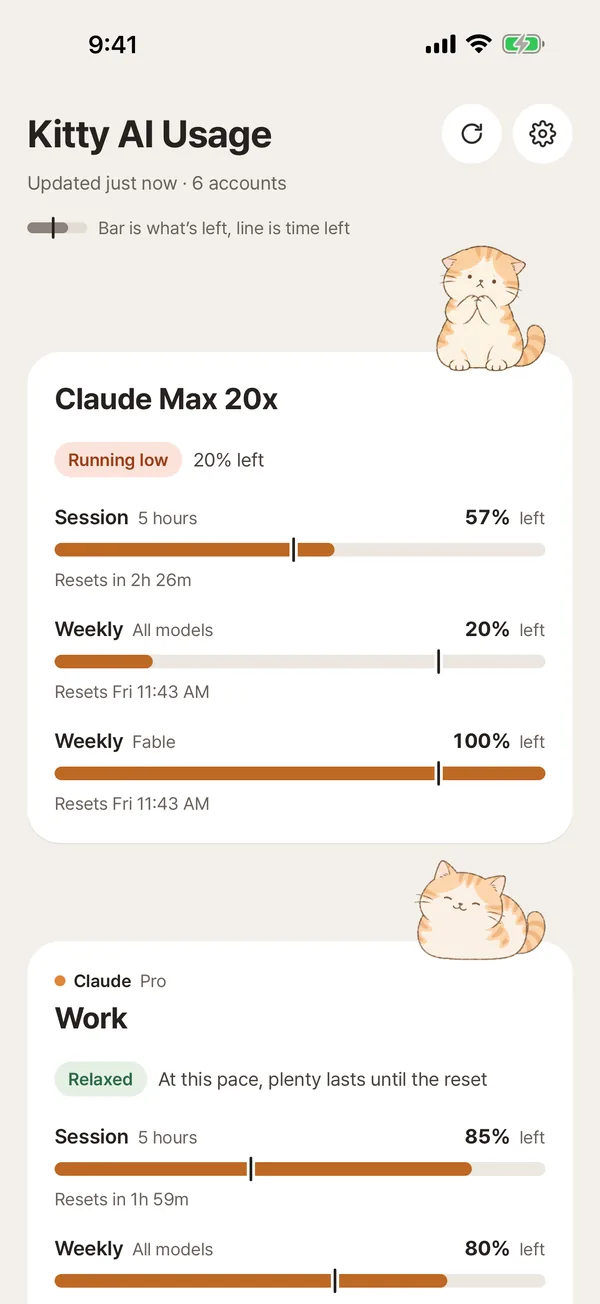
Each account shows its 5-hour session and weekly limits as bars, with the time until each one resets. See what's left or what you've used, your choice. Connect several work and personal accounts and see them on one screen.
Know when you'll run out
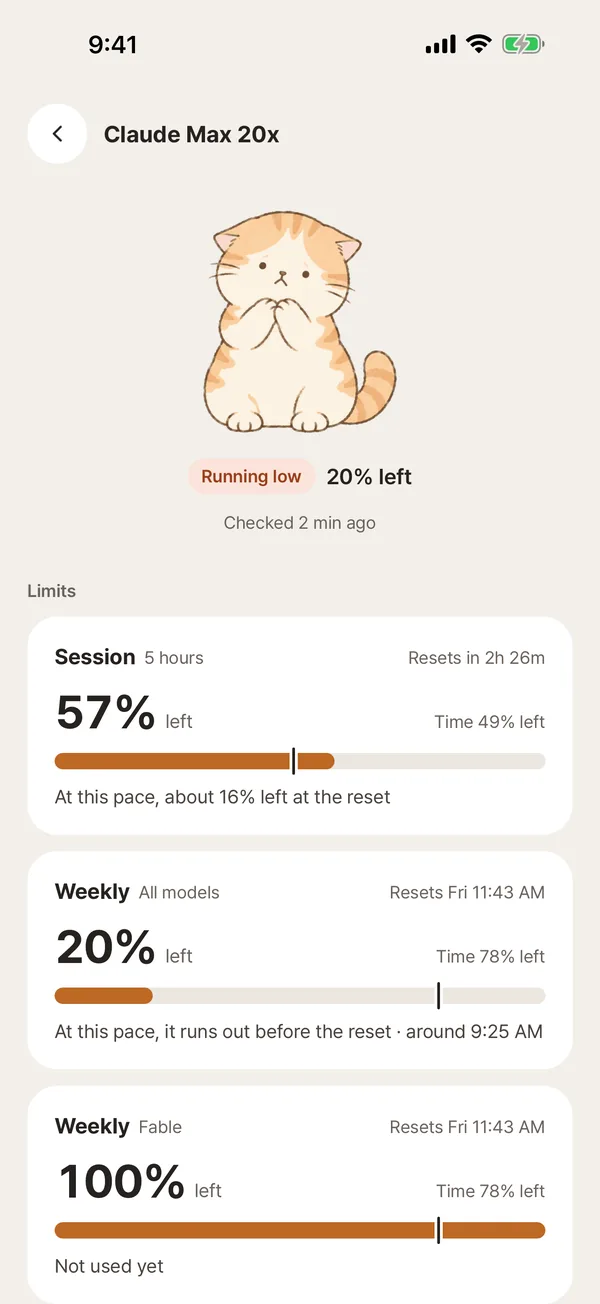
From the pace you've been using it, the app tells you whether a limit will run out before it resets, and roughly when. One look at the cat tells you how it's going.
Right on your home screen
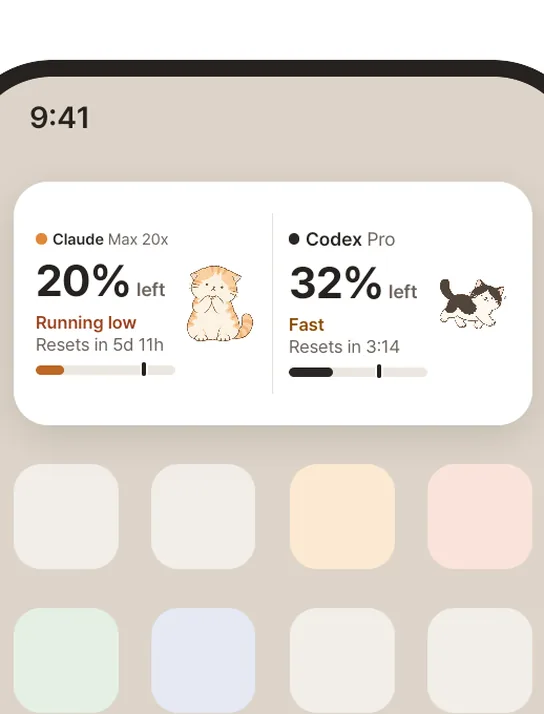
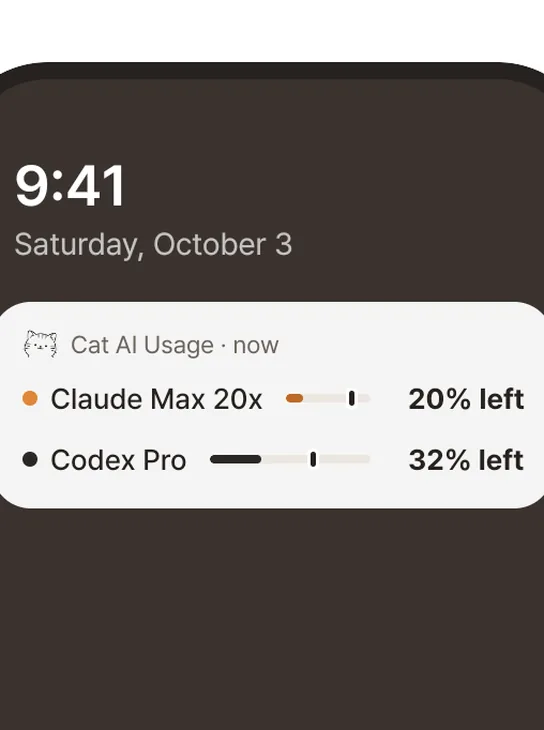
Small, medium and large widgets show Claude and Codex side by side. On iPhone you can add lock screen widgets too.
A gentle nudge before you run out
Get alerts at 20% left, when you're going fast, and when a limit resets, plus a reminder 3 days before a sign-in expires. On Android you can keep a status notification showing at all times.
See it in 30 seconds
A short intro to Cat AI Usage, the app that shows your remaining Claude and Codex limits and reset times in a cat widget. YouTube
Ways to check your Claude and Codex usage
Claude and Codex each show your usage on their own official pages, which are accurate and free. This app is handy if you check often on your phone or want a heads-up before you run out.
| Method | Where | Without opening an app | Alerts | Multiple accounts |
|---|---|---|---|---|
| Claude Settings → Usage | claude.ai web and desktop app | No | No | Sign in to each account separately |
Claude Code /usage | Terminal | No | No | The signed-in account |
Codex /status | Terminal (Codex CLI) | No | No | The signed-in account |
| ChatGPT Codex usage page | chatgpt.com | No | No | Sign in to each account separately |
| Cat AI Usage | iPhone, iPad, Android | Home and lock screen widgets, status notification | 20% left, fast pace, reset, sign-in expiry | Several Claude and Codex accounts together |
Services may rename or move their official pages. Accurate as of October 2026. Sources: Anthropic Help Center – How do usage and length limits work?, OpenAI Codex pricing (usage dashboard and /status)
Get started
- Install Cat AI Usage from the App Store (as Kitty AI Usage) or Google Play.
- Tap Add account and choose Claude or Codex (ChatGPT).
- Sign in on the service's official page (claude.ai or chatgpt.com), and your usage appears right away.
- Add a widget to your home screen or lock screen, and turn on the alerts you want.
Sign-in and privacy
- You sign in on the official claude.ai and chatgpt.com sign-in pages. The app never sees your password.
- The app reads only usage and part of each account's email, to tell accounts apart. It never requests or reads your conversations.
- Sign-in sessions are encrypted in your device's secure storage, such as the iOS Keychain and Android Keystore.
- No developer servers, no ads, no analytics and no tracking. Nothing leaves your device.
- Remove an account from this device or delete the app, and everything it stored is gone.
App facts
- Name
- Cat AI Usage (Google Play: Cat AI Usage: Claude & Codex; App Store: Kitty AI Usage). Korean 고양이 AI 사용량, Japanese ねこAI使用量
- Works with
- Claude (claude.ai account), Codex (ChatGPT account)
- Shows
- 5-hour session limit, weekly limits (all models and per model), reset times, plan name, Codex reset credits and their expiry
- Devices
- iPhone and iPad (iOS 15.1 or later; widgets need iOS 17), Android 7.0 or later
- Price
- Free, no ads. An optional one-time tip unlocks a supporter card; every feature works without it
- Languages
- English, Korean, Spanish, Japanese
- Released
- Google Play October 9, 2026; App Store October 17, 2026
- Latest version
- 2.1.4 (October 30, 2026)
- Made by
- Ratel Studio, Hanam, Korea
- Contact
- hello@ratelstudio.app
FAQ
- How do I check my Claude usage limit?
- Open Settings → Usage on the Claude website or desktop app, or run
/usagein Claude Code. To see it on your phone's home screen, use the Cat AI Usage widget. - Where can I see my Codex usage?
- Type
/statusin the Codex CLI or open the Codex usage page on chatgpt.com. Once you sign in with your ChatGPT account, Cat AI Usage shows the Codex limits that apply to your plan (5-hour and weekly) and their reset times in a widget. - When do Claude and Codex limits reset?
- According to Anthropic's help center, paid Claude plans have a session limit that resets every five hours and weekly limits that reset once a week. Codex also has five-hour and weekly limits, and which ones apply depends on your plan (OpenAI pricing). Cat AI Usage shows the reset time each service reports and can notify you when a limit resets.
- Is there a Claude usage widget for iPhone or Android?
- Yes. Cat AI Usage has home screen and lock screen widgets on iPhone and iPad, and home screen widgets plus a status notification on Android, in small, medium and large sizes.
- Is it free?
- Yes, it is free with no ads. You can leave an optional one-time tip if you like it, but every feature works without it.
- Is my sign-in safe?
- You sign in on each service's official page, and the session is encrypted in your device's secure storage. There are no developer servers, so nothing leaves your device. See the privacy policy for details.
- Is it an official Anthropic or OpenAI app?
- No. It is an unofficial app made by Ratel Studio. Claude is a trademark of Anthropic; Codex and ChatGPT are trademarks of OpenAI. When a service changes, numbers may be off for a while.
- Which plans does it work with?
- Any Claude account whose limits appear under Settings → Usage on claude.ai, and any ChatGPT account that can use Codex. The app shows the plan name (for example Max 20x, Pro or Plus) and limits exactly as each service reports them.
- Can I see more than one account?
- Yes. Connect several Claude and Codex accounts, such as work and personal, reorder them, and choose which ones appear in widgets.
- Why don't the numbers match the website?
- Tap Refresh now on the account screen. If they still differ, remove the account from this device, connect it again, and let us know at hello@ratelstudio.app.
More
Cat AI Usage is an unofficial app, not affiliated with Anthropic or OpenAI. Claude is a trademark of Anthropic; Codex and ChatGPT are trademarks of OpenAI.
Last updated